sapota

A memory for the feelings between the things that happen.

Your calendar has the meeting. Your photos have the holiday. Nothing holds the ten minutes in the car afterwards — until now, in your own voice, on a phone that cannot send it anywhere.

the moment
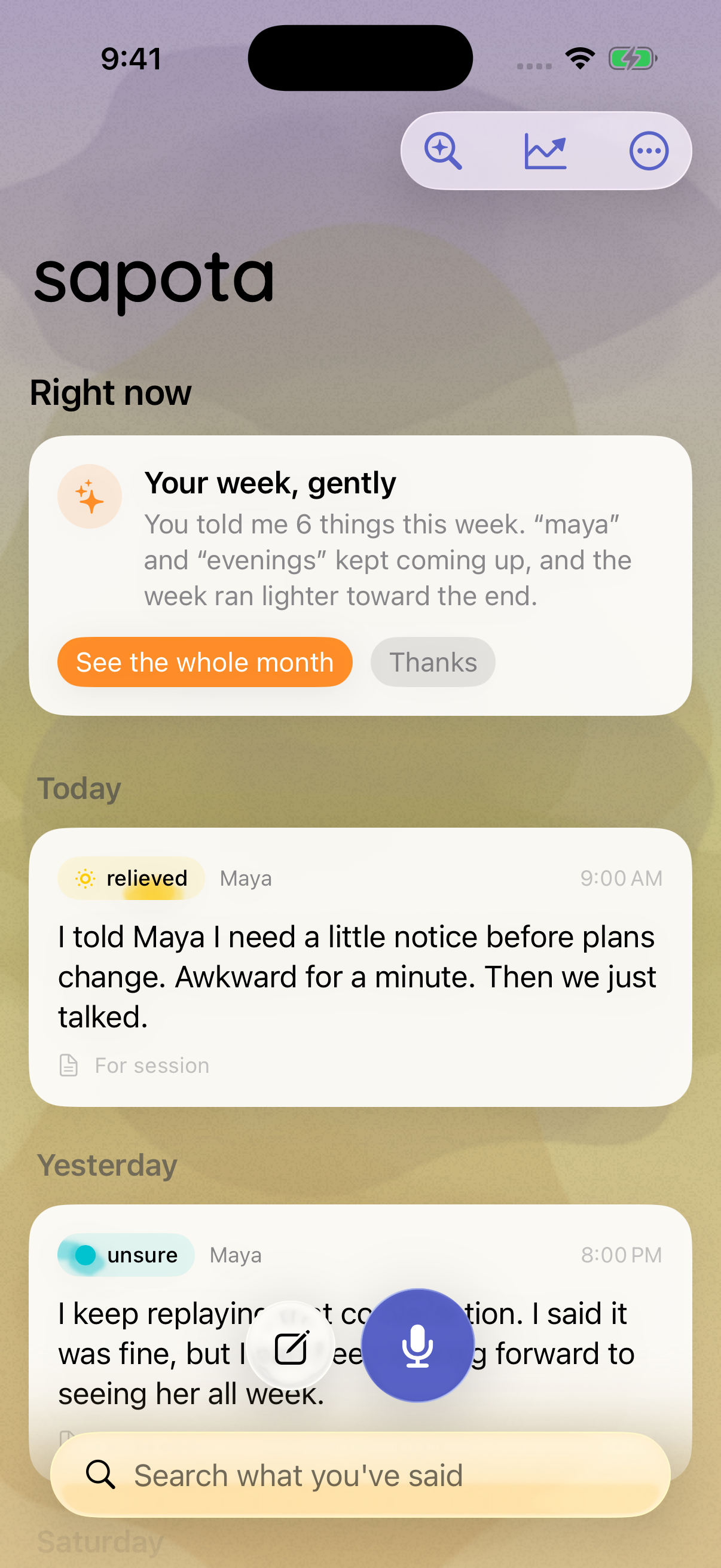
Sapota's home screen: a watercolour wash, today's entries in the person's own words, each tagged with the feeling it heard.

“I keep saying I’ll deal with it and then I don’t.”

Said out loud at 11:52 on a Sunday, from a locked phone. Transcribed on the device it was said to, kept there, and sent nowhere.

The thoughts worth keeping arrive while you’re driving, at 3am, on the pavement outside a hard conversation. Every one of those moments has the same two problems: no keyboard, and no privacy. Sapota is built for that moment rather than for the evening you were going to write it up.

the promise

Nothing you say leaves this iPhone.

Not your voice, not the words, not what Sapota works out from them. There is no server and no account, so we aren’t being careful with your data — we never have it. There is exactly one exception and it is listed below, because a promise with a named exception is the only kind worth making:

  • No network code of our own. The app makes no request to any server we run, links no networking frameworks, and ships nothing written by anyone else. There is nowhere for it to send anything.
  • Transcription happens here. On Apple’s on-device engine. If a phone can’t do that, Sapota refuses to record and offers the keyboard instead of quietly using a server.
  • Two web addresses in the whole app. A crisis helpline directory, and the privacy page you are reading.
  • One exception, named plainly. If you switch on place names, your coordinates go to Apple’s geocoder to come back as a word like “Office”. It is off until you ask for it, and it is the only thing that ever leaves.
  • Everything is yours to take or destroy. Read it back, export it as plain text, or delete every trace in two taps.
  • The App Store label reads Data Not Collected, because none is.
ways in

You never have to open it.

An app you have to go and find is an app you won’t use. Thoughts arrive while you’re driving, or lying awake, and the phone is already locked in your hand.

  • “Hey Siri, talk to sapota”nothing to set up Works from a locked phone in your pocket, hands nowhere near it.
  • Back Tapevery iPhone Tap the back of the phone twice. Assigned once in Accessibility settings.
  • Action ButtoniPhone 15 Pro and later Hold it and talk. Let go and it’s kept.
  • Control Centre and Lock Screenevery iPhone One control, added once. It can replace the torch on your Lock Screen.
the loop

It asks how Friday went, because you said Friday.

Say “the deadline is Friday” into your phone on Tuesday. On Saturday it asks how Friday went.

Not read off your calendar, which knows about meetings but nothing about you. Taken from the sentence you actually said. It uses Apple’s date detector rather than a language model, so it works on every iPhone and cannot invent a promise you never made.

what it notices

One thought is a note. A few weeks of them is a pattern.

Threads screen: Deadline, Side project, Boss meeting and Gym, each with a count of thoughts, the span of days, a feeling and a small trend line.
Threads gather on their own. Thoughts about the same thing, or the same person, collect and carry a line through the weeks. You tag nothing.
Reflections screen: a month-long mood trace, a chart of which parts of the day sit heaviest, and short nights compared against full ones.
The month, read back. Lighter and heavier days, when in the day things sit worst, and what a short night does to you. All computed on the phone.
The Ways to Talk screen listing Hey Siri, Back Tap, Control Centre, the Lock Screen and the Action Button.
Five ways in, none of them the app. Back Tap works on every iPhone. Siri needs no setup at all and works from a pocket.
  • Threads

    Thoughts about the same thing, or the same person, gather on their own and carry a line through the weeks.

  • The week, read back

    Every Sunday evening, a short reflection built only from what you actually said. No pep talk, no clichés.

  • Follow-ups on your own words

    Say “the deadline is Friday” and on Saturday it asks how Friday went. Not read from your calendar. Heard from you.

  • Your body, gently

    With permission it reads sleep and heart signals from Apple Health, and goes easier on you after a short night.

how often it speaks

It will never nag you.

Sapota checks in before a big day, after a rough night, or when something you mentioned has been and gone. Then it stops. These aren’t settings buried somewhere. They are the rules.

Three a weekThe ceiling on anything Sapota raises by itself, however much it has noticed. A reminder for a session you scheduled sits outside it, because you asked for that one.
Never 10pm to 8amNothing before seven in the morning either, even on a big day.
Four ignoredIgnore a kind of message four times and it stops sending that kind for a month, on its own.
No streaksNothing to keep up, no badges, nothing to feel guilty about.
in the room

Bring it to your session.

If you see a therapist, Sapota turns a stretch of weeks into one page for the room: what came up, what set it off, and the moments you tick. Made on the phone, lockable with a password, and shared only by you.

Sapota is not therapy and not a medical device. It doesn’t diagnose, and it isn’t a substitute for care.

the name

A sapota is a small brown fruit that is only good once it has had time to soften. Unripe, it’s astringent. Give it a few days and it tastes like caramel.

the beta

It’s in TestFlight.

The public link goes here once Apple approves the build. Until then, write and you’ll be first to get it.

hello@getsapota.com

There is no sign-up form on this site, and no analytics or cookies. That would be an odd way to begin.